
First open
Your First Visit to COME
A short tour before you join anything. It takes the guesswork out of your first real entry.
Sign In or Sign Up
Use the options COME shows. Pick a method you can always access, such as a phone number or email you check, because you may need it again on another device. Write down which method you used.
Take the Five-Stop Tour
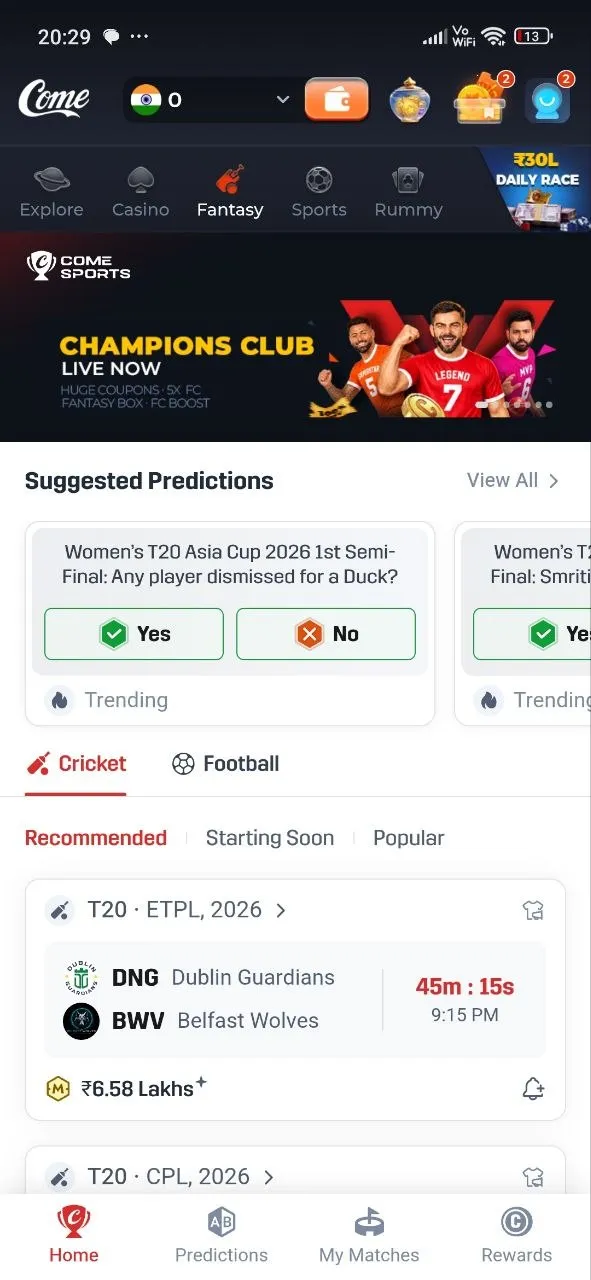
- Home: the start screen, with section tabs at the top.
- Fantasy: choose Cricket or Football, then try the Recommended, Starting Soon and Popular filters.
- A match card: it shows the competition, both teams, a countdown and the start time. Open one.
- The contest screen: read the team requirements, how scoring works, any captain choices, entry details and when entries close.
- Predictions, My Matches, Rewards: tap each in the bottom menu so you know where they are.
Decide What to Try First
- You want to follow a whole match: Fantasy. Pick a match later today so you can check the confirmed XIs at the toss.
- You have a view on one moment: Predictions. Read the full question, then answer Yes or No.
Before Your First Entry
Set a spending limit before you look at any contest. Paid entries can be lost. If an entry has conditions you don't understand, skip it.
After Your First Entry
Open My Matches. Your entry is listed there with its status. Check it again after the match.